
Your HEOS sound.
Always one click away.
HEOS Surfer lives in your Mac's menu bar — free to use. One click to see what's playing, skip a track, adjust volume, or stream radio, without picking up your phone.
Free to use · macOS 14+ · signed & notarized · no account
Optional license — same features, plus a ♥ Supporter badge.

Up and running in a minute
No setup, no account. Three steps from download to sound.
Download
Grab the app and drag it to Applications.
Pick your HEOS device
It finds Denon & Marantz speakers on your Wi-Fi automatically.
Control from the menu bar
Play, skip, volume, radio — one click, no phone.
Everything you need to control
your HEOS device from Mac
Built for people who live in their Mac and refuse to let a phone break their flow.
Now Playing at a Glance
Album art, track name, artist, and a live progress bar — always visible, one click away.
Full Playback Controls
Play, pause, skip, shuffle, and repeat — all from the menu bar. No app switching needed.
Effortless Volume Control
Drag the slider or just scroll your trackpad on the menu bar icon. No popover required.
Max Volume Limit
Set a ceiling and it's enforced — even if HEOS receives commands from another device. Never accidentally wake the neighbors.
Auto-Duck on Calls
Mic goes active — volume fades down automatically. Call ends — volume restores exactly where you left it.
Internet Radio & Streams
Search Radio Browser's global directory of 30,000+ stations, paste any custom stream URL, save your favorites.
Quick App Launchers
Spotify, Tidal, Apple Music and more — opt in to the services you use and launch them from the player footer.
Sleep Timer & Auto-Launch
Set a sleep timer so the music stops when you do. Launch at Login so it's always there, silently waiting.
See it in action
Clean, focused, and always exactly where you need it.
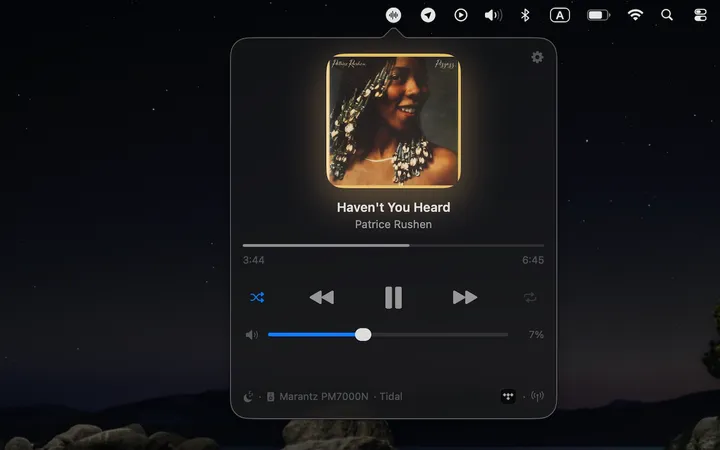
Now Playing
Album art, tint glow, track info, and live progress — always one click away.
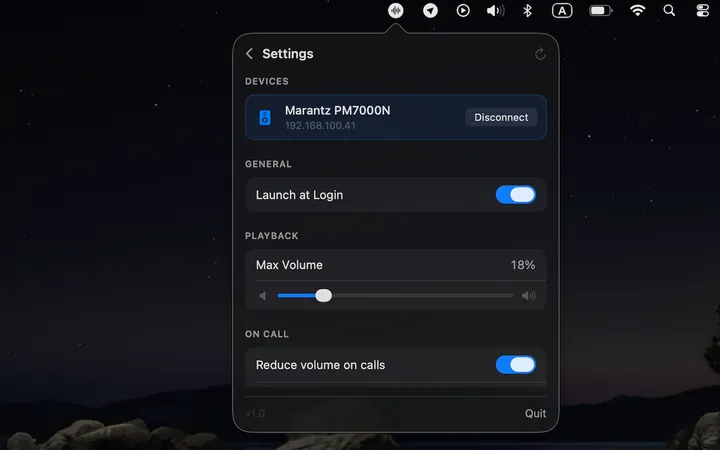
Settings
Device picker, max volume cap, launch at login — everything in one place.
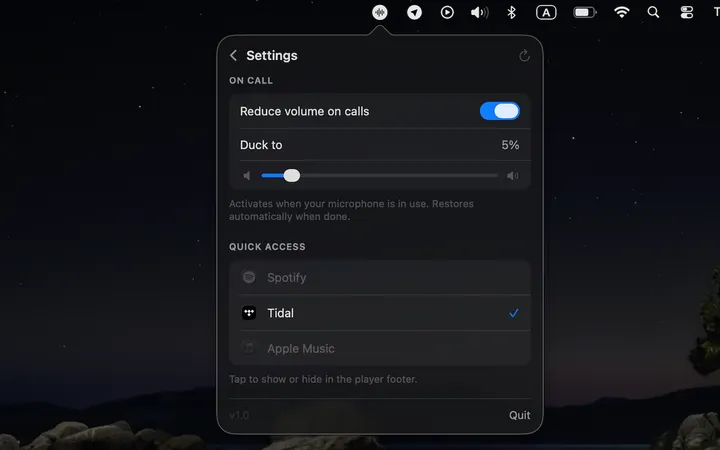
Auto-Duck
Volume lowers automatically when your mic is active. Restores when you hang up.
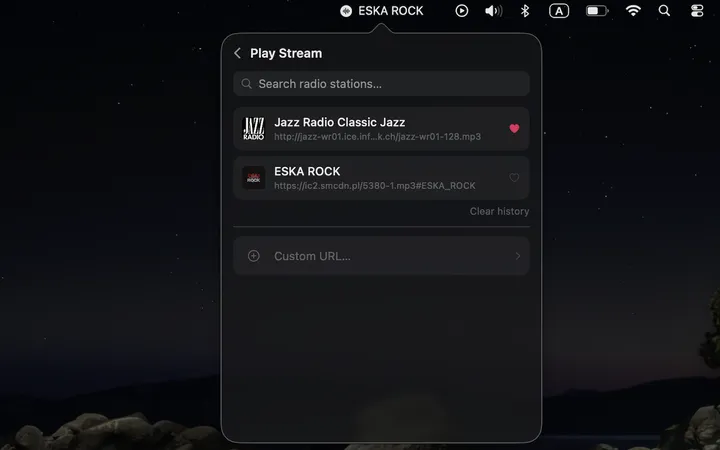
Favorites & History
Save your favorite radio stations and pick up where you left off.
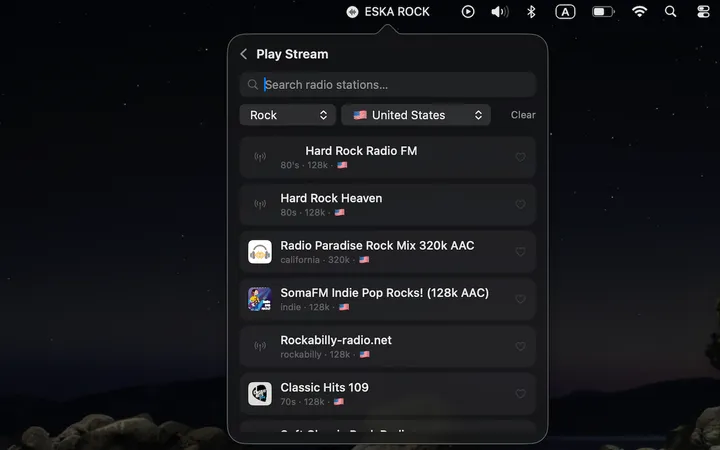
Internet Radio
Search 30,000+ global stations by genre, country, or name.
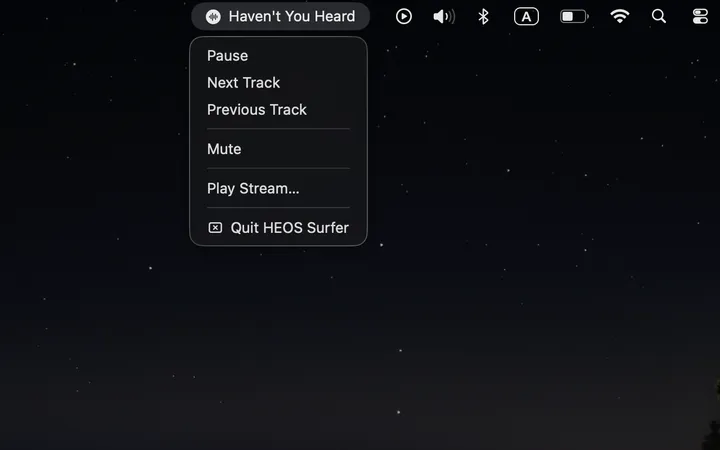
Quick Controls
Right-click the menu bar icon for instant access without opening the popover.
Swipe to see more →
Watch it work
Less setup. Less friction. More music.
Volume in one gesture
Scroll your trackpad on the menu bar icon — the volume follows. Never open anything.
Mic duck — auto volume
Call starts → music fades. Call ends → music restores. Completely automatic.
Internet radio in seconds
Search, pick a station from anywhere in the world, and it's playing.
What's coming next
The roadmap is shaped by your feedback. Tell me what matters most — the most-requested features ship first.
Multi-device switching
Jump between rooms instantly from the main popover — no Settings required.
Request this feature →
Group control
Control HEOS speaker groups — sync playback across multiple rooms.
Request this feature →
Mini mode
An ultra-compact popover with just the essentials — track, play/pause, volume.
Request this feature →
Works with your HEOS system
Works with HEOS-enabled Denon and Marantz speakers, AVRs, soundbars, and network amps — anything on the same Wi-Fi network. Denon Home, Marantz Cinema, HEOS speakers and receivers.
Not sure it'll work? It's free — download and test your own setup in under a minute.
Free to use. Support what it's worth.
HEOS Surfer is free — built by one person. If it earns a place in your menu bar, support development however feels right, and unlock the ♥ Supporter badge. Totally optional; the app is the same either way.
- Funds new features & fixes
- ♥ Supporter badge in-app
- Native macOS — no Electron
- No account, no tracking
- Works on your Macs
Frequently Asked Questions
Is it free?
Yes — HEOS Surfer is fully free to use, with no trial limits and no locked features. Supporting is optional, and it funds development and unlocks the ♥ Supporter badge. The app works exactly the same either way.
How do I get the Supporter badge?
Support the app and a license key is emailed to you. Open the app's menu-bar icon → Support → paste the key, and the ♥ Supporter badge unlocks. No account needed.
Does Denon make an app for Mac?
No. Denon does not make an official Mac app. Their control software (HEOS) is iOS and Android only. HEOS Surfer fills that gap for Mac users with Denon devices. Marantz users can see the Marantz app for Mac page.
Is there a HEOS app for Mac?
There is no official HEOS app for Mac — the HEOS app by Denon is only available for iOS and Android. HEOS Surfer fills that gap: it is a native macOS app that lets you control any HEOS-enabled device directly from your Mac's menu bar.
Can I control HEOS devices from my Mac?
Yes — with HEOS Surfer. The app connects to your Denon or Marantz HEOS device over your local Wi-Fi network using the HEOS protocol, giving you full playback control, volume, and internet radio without touching your phone.
Does Denon HEOS work on Mac?
Denon does not make an official Mac app for HEOS. HEOS Surfer is a third-party macOS app that controls Denon and Marantz HEOS devices — speakers, AV receivers, soundbars — natively from the menu bar.
What HEOS devices are supported?
Any Denon or Marantz device with HEOS built in — speakers, soundbars, AV receivers, and network amplifiers. If it works with the HEOS app on iOS or Android, it works with HEOS Surfer.
Does it require the HEOS app to be installed?
No. HEOS Surfer connects directly to your device over your local network using the HEOS protocol. The official HEOS mobile app is not required.
Does it work without internet?
Yes — all playback control works entirely over your local Wi-Fi network. An internet connection is only used when fetching album artwork or streaming internet radio stations.
What macOS version is required?
macOS 14 Sonoma or later.
Is my data private?
Completely. HEOS Surfer collects no data, requires no account, and never phones home. Everything stays on your Mac and your local network. See the Privacy Policy for full details.
My speaker isn't being found — what do I do?
Make sure your Mac and HEOS device are on the same Wi-Fi network. Some routers with AP isolation or VLAN separation can block local device discovery — check your router settings. You can also try restarting the device.
Can I control multiple speakers?
The current version controls one HEOS player at a time. You can switch between discovered players from the device picker inside the app.
Will it work with my speakers / setup?
HEOS Surfer works with HEOS-enabled Denon and Marantz devices — speakers, soundbars, AV receivers, and network amplifiers — on the same local network as your Mac. If it works with the HEOS app on iOS or Android, it should work here. The app is free to download and try, so there is no risk in finding out.
Changed your mind after supporting?
No problem — if you bought a supporter license and would like your money back, just email us for a refund.